
How to reinstall the operating system (Reinstall OS)

Reinstall the operating system

⚠ Warning: reinstalling erases ALL data on the disk and cannot be undone. Take a backup or a Snapshot first.
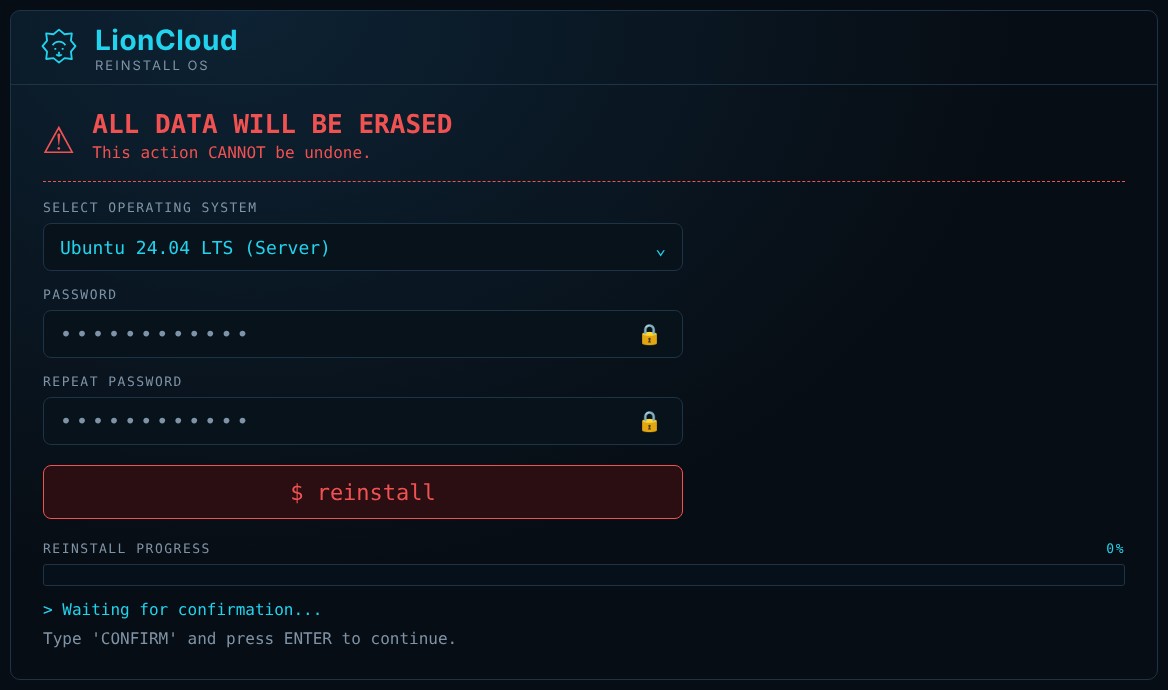
LionCloud reinstall
  1. Open the VPS and go to Advanced → Reinstall.
  2. Under Select operating system, choose the OS you want.
  3. Enter the new root password in Password and again in Repeat password.
  4. Click $ reinstall.
  5. To confirm, type CONFIRM and press Enter.
  6. Wait until Reinstall progress reaches 100%. It usually takes a few minutes.

When it finishes, connect over SSH to the same IP as root with the password you set. The IP address does not change.

  • reinstall, επανεγκατάσταση, os, λειτουργικό, formatvps, νέολειτουργικό, lioncloudreinstall
  • 0 Users Found This Useful
Was this answer helpful?

Related Articles

How to reset the root password of your VPS

Reset the root password If you forgot your root password, you can set a new one from the panel....

Rescue mode: how to recover a VPS that does not boot

Rescue mode Rescue mode boots your VPS into a temporary, safe recovery system. From there you can...

How to open the VNC console of your VPS

VNC console The console gives you the server’s “screen” in your browser. It works even when SSH...

How to start, stop, restart and power off your VPS

Start, stop, restart and power off Power actions are in the Power control section of the...

LionCloud VPS Control Panel overview

LionCloud VPS Control Panel overview The LionCloud panel appears in the Client Area when you open...