How to create a new account in WHM
Create a new cPanel account for a customer:
- Log in to WHM.
- Go to Account Functions → Create a New Account.
- Fill in Domain, Username, Password and Email.
- Choose a Package (or set options manually).
- Click Create.
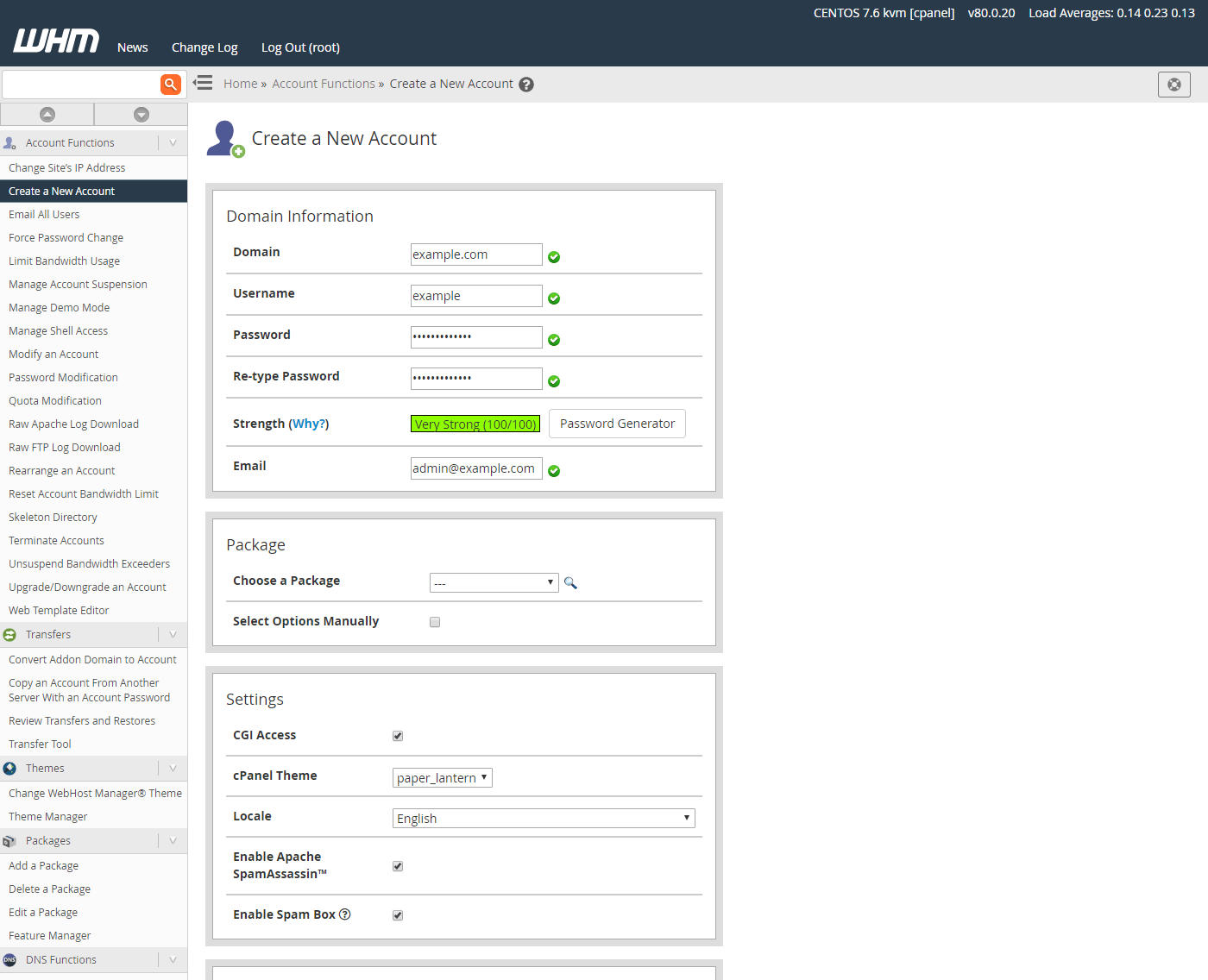

Create a new cPanel account for a customer:
How to restore a backup in WHM Restore an account from a backup. Go to Backup → Backup...
How to use the Transfer Tool in WHM Transfer accounts from another cPanel/WHM server. Go to...
How to suspend or unsuspend an account in WHM Suspend an account to temporarily disable it. Go...
How to manage DNS zones in WHM Edit DNS records for domains on the server. Go to DNS Functions...
How to list and manage accounts in WHM View and manage all cPanel accounts on the server. Go...
Copyright © 2026 Lionhost Premium Services. All Rights Reserved.
Reliable hosting with human support, wherever your business is headed.
Copyright © 2026 Lionhost Premium Services. All Rights Reserved.
New products, freebies, and news — straight to your inbox.
Reliable hosting with human support, wherever your business is headed.
Copyright © 2026 Lionhost Premium Services. All Rights Reserved.
