
How to restore backup in WHM

How to restore a backup in WHM

Restore an account from a backup.

  1. Go to Backup → Backup Restoration.
  2. Choose Restore by Account or Restore by Date.
  3. Select the account and the backup date.
  4. Choose what to restore (subdomains, mail, MySQL, etc.).
  5. Add the account to the queue and click Restore.
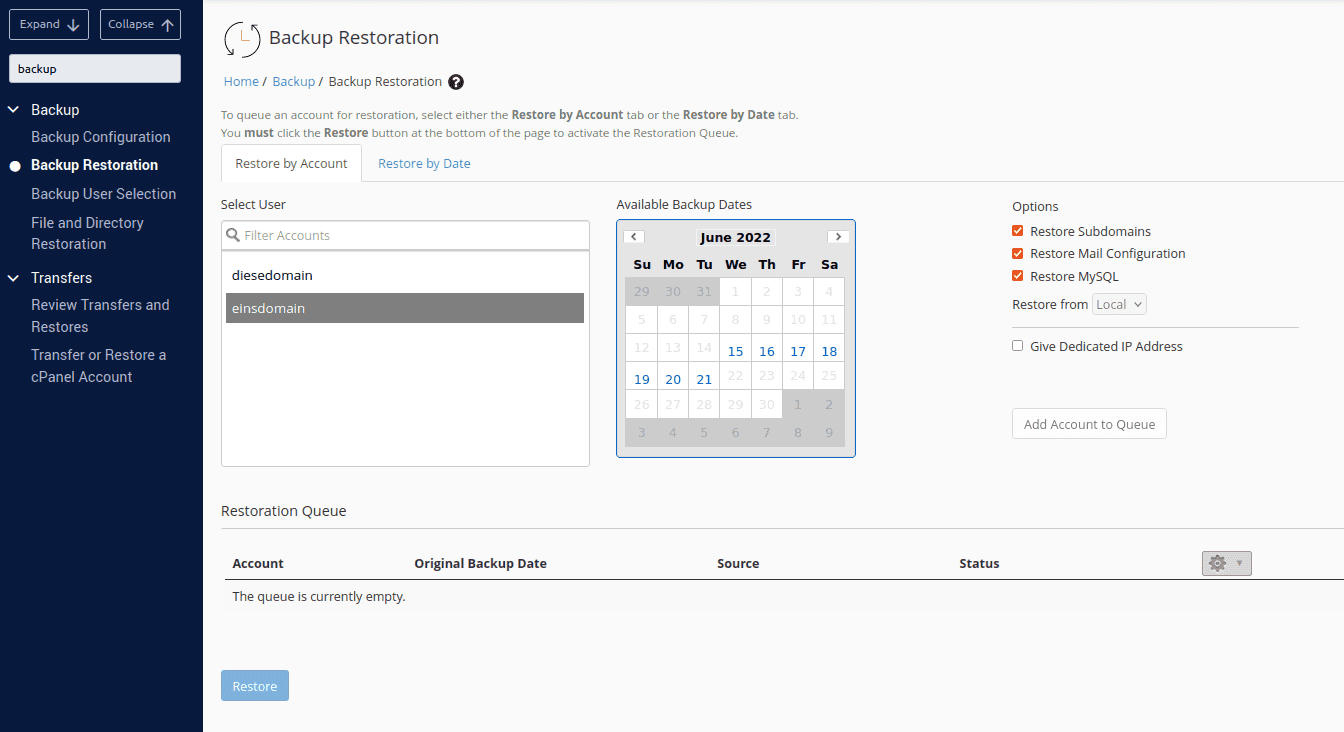
WHM Backup Restoration
  • whm, backup, restore, αντίγραφοασφαλείας, backuprestoration, επαναφορά, whmbackup
  • 0 Users Found This Useful
Was this answer helpful?

Related Articles

How to use Transfer Tool in WHM

How to use the Transfer Tool in WHM Transfer accounts from another cPanel/WHM server. Go to...

How to suspend account in WHM

How to suspend or unsuspend an account in WHM Suspend an account to temporarily disable it. Go...

How to manage DNS in WHM

How to manage DNS zones in WHM Edit DNS records for domains on the server. Go to DNS Functions...

How to list accounts in WHM

How to list and manage accounts in WHM View and manage all cPanel accounts on the server. Go...

How to create package in WHM

How to create a hosting package in WHM Packages define the resources (disk, bandwidth, email...
