
How to use WordPress Toolkit in Plesk

How to use WordPress Toolkit in Plesk

Manage WordPress installations, plugins, themes, security and updates from one place.

  1. Open WordPress from the menu or domain.
  2. View status, install plugins/themes, run security checks.
  3. Enable Smart Updates or maintenance mode if needed.
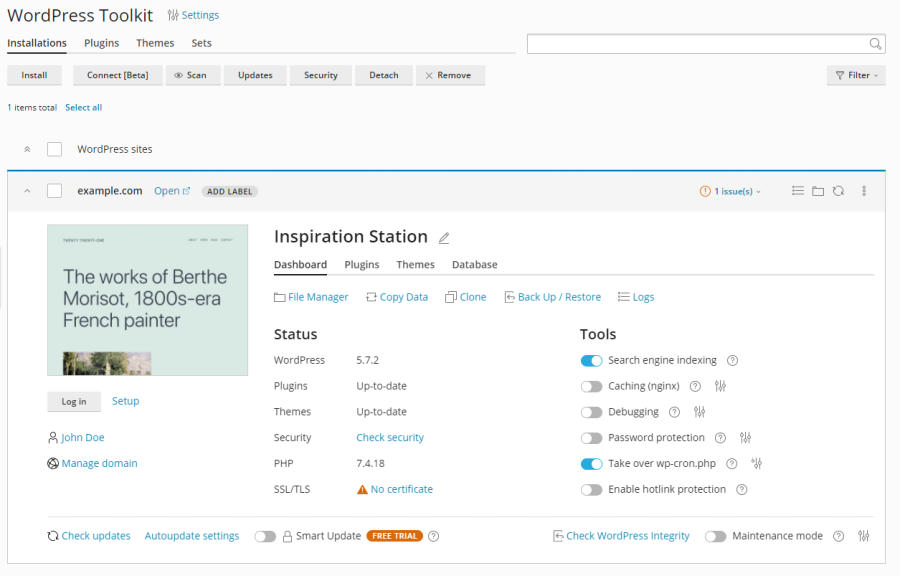
WordPress Toolkit
  • wordpress, wptoolkit, wordpressplesk, plugins, themes, wordpressmanagement, ενημέρωσηwordpress, wptoolkitplesk
  • 0 Users Found This Useful
Was this answer helpful?

Related Articles

How to change PHP version in Plesk

How to change PHP version and settings in Plesk Open your domain and click PHP Settings....

How to install free SSL in Plesk

How to install a free SSL certificate in Plesk Open your domain and go to Let's Encrypt /...

How to create a cron job (scheduled task) in Plesk

How to create a scheduled task in Plesk Open your domain and click Scheduled Tasks. Click...

How to find FTP credentials in Plesk

How to find FTP credentials in Plesk Open your domain and click Connection Info. View the...

Plesk Extensions Catalog

Plesk Extensions Catalog Install and manage extensions from the Extensions Catalog.
